Auto-translated from Spanish
A few months ago, YouTube rolled out a new A/B testing feature for content creators on the platform. If you use it, you’ll likely generate more impact and see your growth happen in a natural, steady way.
Where Is This Feature?
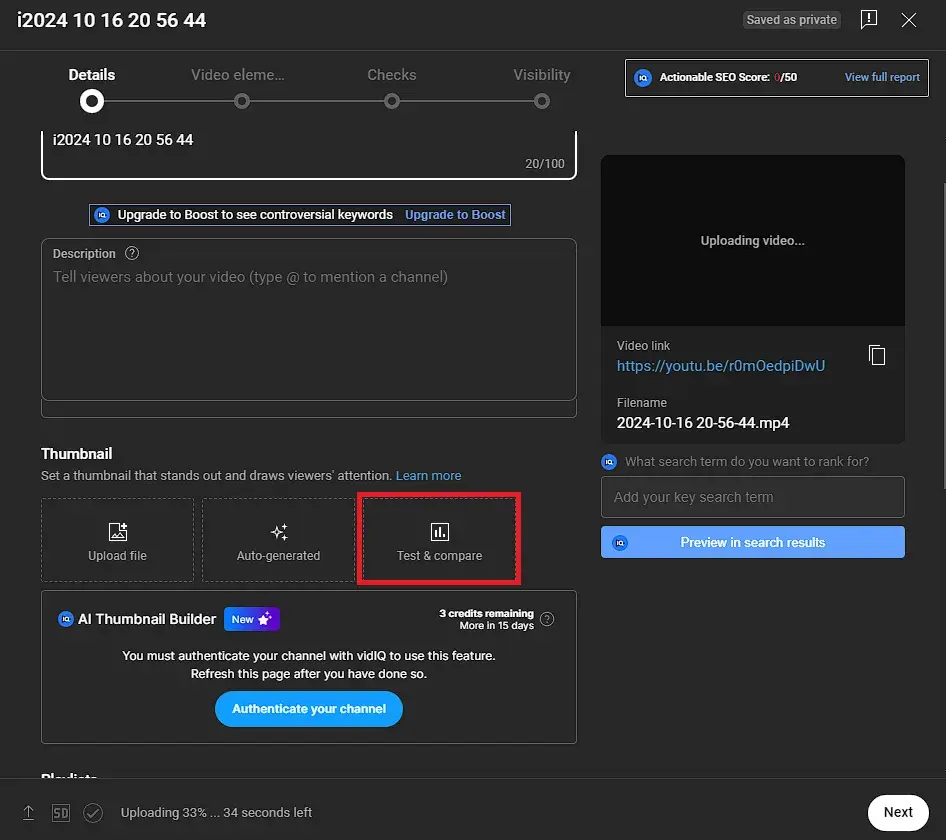
Keep in mind that to use this feature, your account needs to be registered with two-step verification enabled. If you’ve already got that set up, keep reading.
All you have to do is upload your video, and in the Thumbnails section you’ll find this testing option. Once there, you can upload up to 3 different thumbnails.
Note: if you upload two different thumbnails, YouTube will show one to 50% of users and the other version to the remaining half. Try running this test with graphics that are completely different from each other — it’ll be much easier for the algorithm to determine which option performs better.
How Do You Know Which Thumbnail Is Best?
Once the test period has run its course (it usually lasts between 5 and 15 days), you’ll see a result like the one in the screenshot below. There, you’ll find out which thumbnail performed better based on watch time.
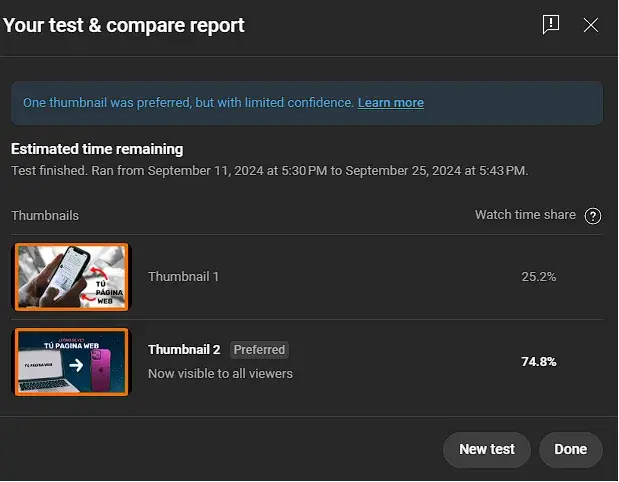
Note: to measure which thumbnail is better, YouTube uses watch time as the main factor, so I recommend making eye-catching thumbnails that are NOT misleading.
So What’s It Actually For?
To get more views, more subscribers, and a better community. Keep in mind that, based on this thumbnail A/B test, YouTube will be able to show your content to even more users, so I’d recommend leaving whichever thumbnail YouTube selected as the default.