
Auto-translated from Spanish
In this article I’ll show you what I consider the 5 keys to landing at least on the first page for the searches that matter most to you or your business.
A QUICK INTRO
Today I’m going to walk you through a little story with a big challenge… showing up in Google’s top results for your company’s own name. In this case, we’re going to start from the beginning, which will gradually get us to the end result. Let’s tackle this the right way:

KEY 0: THE SMALL BIG STEP… GOOGLE SEARCH CONSOLE
There’s something you can do right now that, on its own, will help the different pages on your site — homepage, product pages, contact page, etc. — show up across Google’s various results.
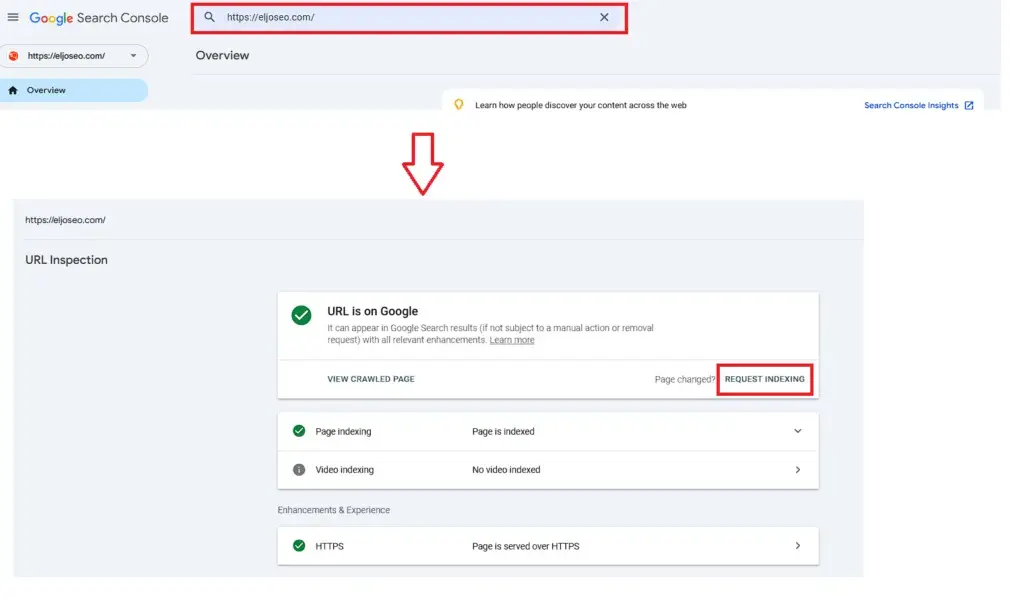
To do this, all you need to do is install and link Google Search Console to your website.
This step depends a lot on your CMS (Content Management System) — some common examples are WordPress, Shopify, GoDaddy, Drupal, and others. I’d recommend just searching how to set this tool up for whatever you’re using, with something simple like: How to install Google Search Console on X (your CMS name).
I’ll leave you a few simple, general steps you can follow to get this tool running, plus a chain of YouTube videos below to help even more.
IMPORTANT: I didn’t mention this, but this tool is 100% FREE and, as the name suggests, it’s Google’s own.
Steps to install Google Search Console on your site
- Create a Google Search Console account — for this step you’ll need a Gmail account.
- Once you have the tool open, you’ll see two setup options: by domain or by URL prefix. Choose DOMAIN.
- It’ll ask you for a URL, so enter your domain name, for example: eljoseoweb.com
- It’ll give you a verification code that you’ll need to add to your CMS (check out my video below for more on this).
- And that’s it — you’ll have this tool up and running on your site.
Start with this video:
TELL GOOGLE TO SHOW YOUR CONTENT
There’s one simple action you can take once you have this tool set up: request indexing for your content. This tells Google you want it to take that specific URL into account, and in most cases, that alone is enough to get you showing up on Google at all.

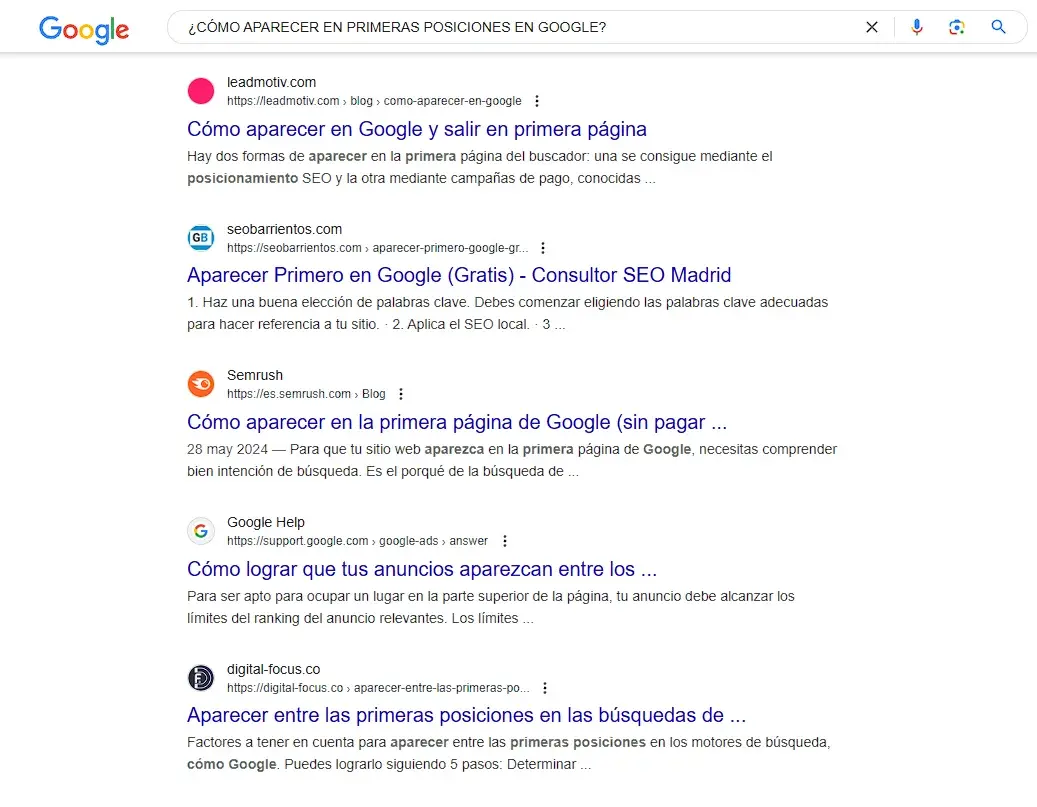
KEY #1: META TAGS
Meta tags sound like something super technical, but honestly, they’re really easy to understand. Take a look at the image below and you’ll see the two main meta tags… the larger title (blue) is the meta title and the descriptive text (black) is the meta description. With that cleared up, keep reading below:
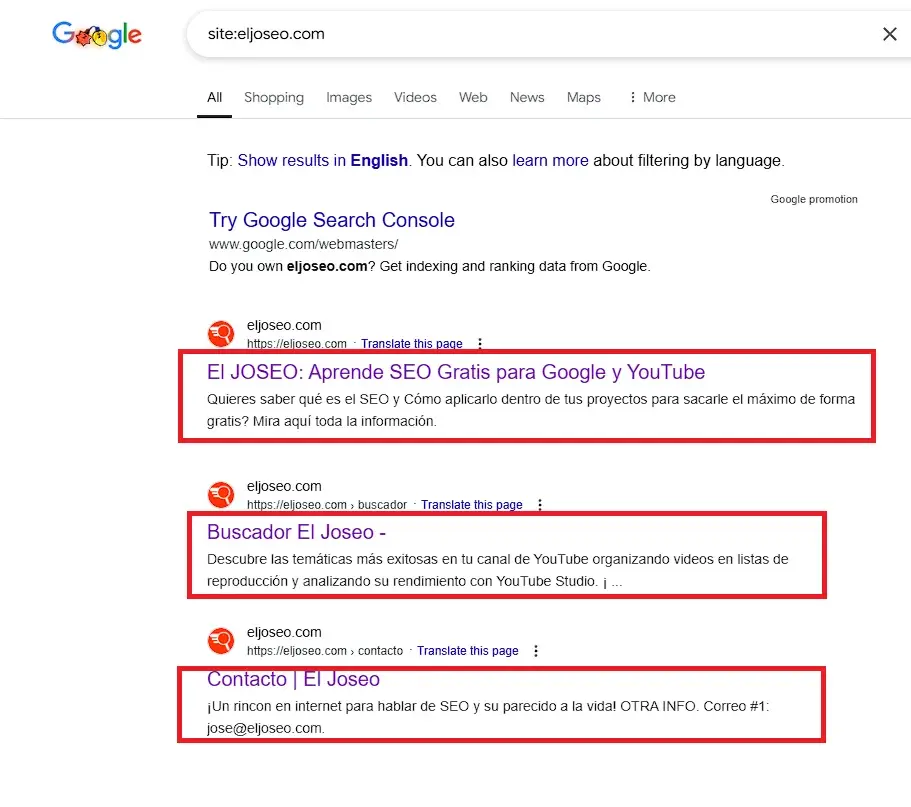
These meta tags we just looked at are essential for sending Google clear signals that you want a specific URL or page to show up when a user types something into Google.
Example: if you run a bike sales business, you’ll most likely want to rank at the top for searches like:
- buy a bike
- buy a red bike
- what’s the best mountain bike?
These and other search queries — or what we call keywords in the SEO world — will determine what you put in those two meta tags. If you want to learn how to find them, check this keyword research guide.
GENERAL TIP: include that keyword in both the title and the meta description. Doing this alone is already an important step toward showing up for queries relevant to your business. Keep in mind that everything depends on your business, your competition, and how complex your particular market is.
How do I edit the meta tags on my website?
To keep this from turning into a novel, here’s a video and an article showing you clearly how to do this in just a few steps for the most popular CMS platforms.

KEY #2: H TAGS
Content needs structure. That’s how we make sure it’s easy to read and understand.
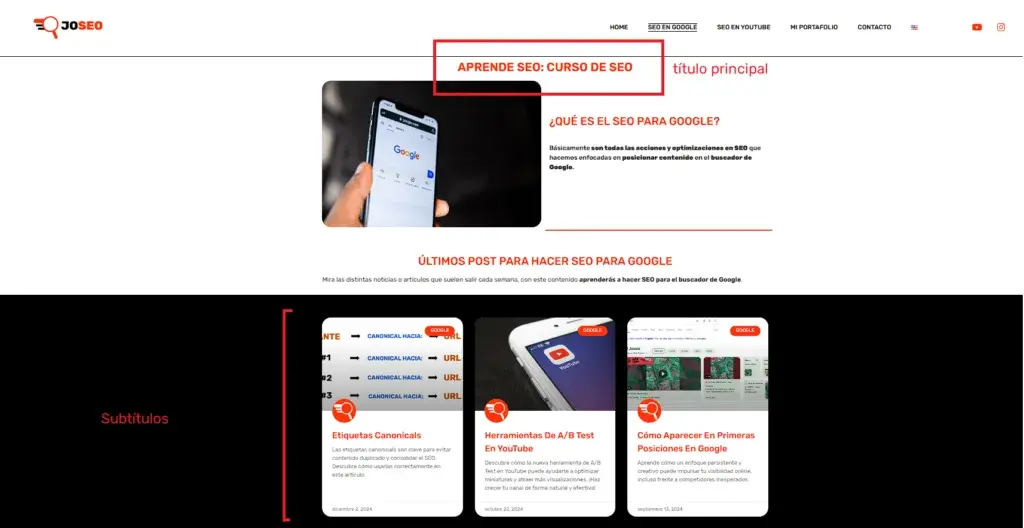
Take this article as an example: there’s a main title, which then branches into subtopics — first a general overview of how to reach the top, then a related trick for inspecting a URL, and finally the keys you need to keep in mind to start getting real SEO results.
These titles and subtitles need to be marked up in a technical way, and that’s done through the HTML code that every website in the world is built with.
With HTML, you can, for example, define which is your main title, which are your subtitles, and so on.
Want to learn more about H tags?
There’s one tag in particular that, once you optimize it and adjust it to match your keyword, sends Google even stronger signals to help rank you the way you want. That tag is the H1 tag.
By editing the H1 tag and placing your main keyword in it, you’ll be one step closer to landing in those top Google results.
How do I edit the H1 in WordPress?
Editing an H tag or Heading 1 depends a lot on the content editor you’re using.
I’d recommend adding the heading widget and checking whether you have the option to change it — it usually reads Heading 1, Heading 2, and so on. Select Heading 1, save, and confirm with the SEO extension that it landed as an H1.

KEY #3: CONTENT
You’ve made it to one of the most important keys for ranking at the top: CONTENT. If you optimize your content around that keyword, let me tell you, you’ll have a real shot at beating your competitors at their own game and climbing to those coveted top positions.
For this topic, let me give you a simple example. Say you want to rank at the top when someone types “mountain bike” into Google’s search bar.

What you’ll notice is a very e-commerce style of content — a main title (in red) followed by the different products or services on that page.

Here you can see a main title (in red) followed by information, an image, and a whole river of additional content.
WHICH TYPE OF CONTENT IS BETTER FOR REACHING THE TOP?
Looking at these two examples, which one do you think is the better fit (just based on the small description under each image) for the query “mountain bikes”? Do you know?
Honestly, I don’t know the answer — and giving the right one really depends on a lot of variables.
The first thing you need to do is GO TO GOOGLE! Type in the keyword “mountain bikes” and you’ll find your answer right there, young padawan.
By looking at the structure and content of the top-ranking pages, you’ll know what type of content you should be building if you want a shot at that podium.
And here’s a key a lot of people miss: your content should be, as much as possible, the sum of what those top results are already doing — meaning it should be better than your competitors’, but with a similar structure. After all, if they’re ranking first, there’s a reason for it.
Create content that covers that product or service better than anyone else, include that keyword and its variations, and you’ll see everything start to click into place.
Search intent
Every query we type into Google carries an intent. These intents mostly fall into two buckets:
- Informational: we’re looking to learn about a topic.
- Transactional: we’re looking to buy something.
Here’s a video to help you understand this slightly more advanced SEO topic a bit better:
One extra tip — where do I even get these keywords?
I’ve been talking about queries and search terms since key #1, but… how do you actually figure out which keywords matter for your business, and how do you work with them?
Great question, and the answer is in this video, take a look:

KEY 4: DO YOU WANT TO RANK #1 FOR YOUR OWN BRAND OR COMPANY NAME?
As the final part of this article, I want to walk you through a specific situation I went through while ranking for my own brand name, “El Joseo,” which I know will help you improve the ranking for your own brand’s main keyword too.
SIZE UP THE COMPETITION
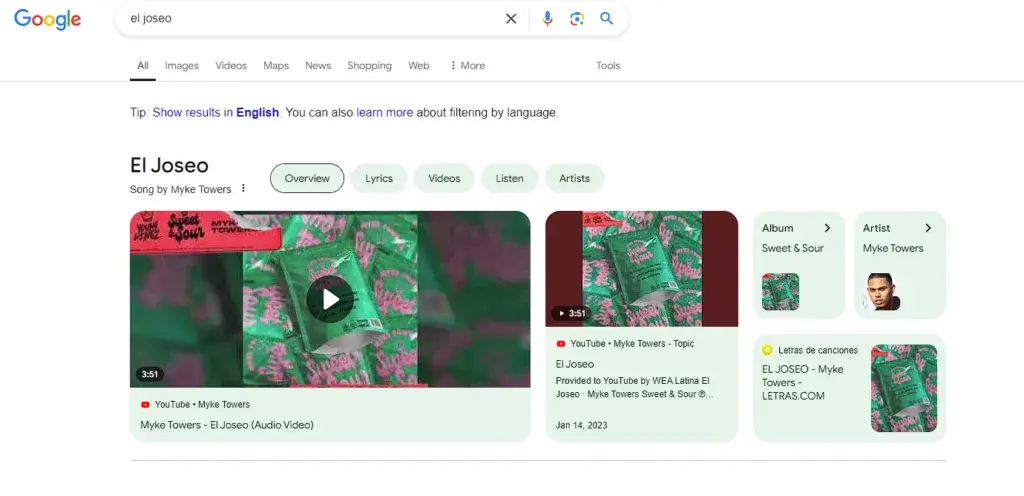
As you’ve probably noticed, this website is called El Joseo. I know, super creative. The main goal here was: showing up in Google’s top results when someone searched “El Joseo,” at least in Colombia (the country I’m currently in). As of the time I’m writing this post, I’m sitting at position #2 for that exact search.
So the real question is… how did I get there? Let me walk you through it.
One of the first things I did was, honestly, look at my competition — meaning, check which pages were showing up at the top for that keyword, which happened to contain my company’s own name. In my case, what was showing up was a song by Mike Towers called “El Joseo,” which made for a pretty unusual situation, since most of my “competitors” were platforms like Spotify, lyrics sites, dictionaries, and more. It’s a word that, apparently, can mean quite a few different things.
Seeing this, I told myself: okay, I think we’re in decent shape here — all we need is something that’s very simple to say and, at the same time, hard to pull off: generate more engagement for that keyword on my own website than a Mike Towers song was getting, which, as I mentioned, was just redirecting people to different music platforms.
HOW DID I GET MORE ENGAGEMENT?
I have to be honest with myself and with you — I actually spent a good chunk of time (5 months) searching “El Joseo” on Google and scrolling down until I found my own website, then clicking through to it. That, my friend, is generating engagement — a click, plus a relatively good-quality session.
In other words, by signaling to Google that my content answered that specific query more directly, I was pushing it to show my website higher and higher.
That’s the key: push your brand, push your main URL, and if you do the work right, you’ll get results.
That said, you should know that no matter what actions I took, if Google didn’t genuinely think my website belonged there, it would drop that URL from the top without hesitation — so at least we know the system is working the way it should.
CONCLUSION
There will always be unique situations, but one thing that never changes is that with these tips, keys, and SEO techniques, you’ll be able to get better organic results for your business.
If you need extra help taking your SEO to the next level, you can reach out to me here: SEO Consultant